How to set up Salesforce in Claude (Claudeforce)
To use Salesforce in Claude you need Claude Enterprise and a supported Salesforce edition. A Salesforce admin activates the Salesforce MCP Server and creates an External Client App; a Claude admin then connects the Salesforce - Beta connector, installs the Sales Cloud in Claude plugin, keeps the beta read-only and rolls it out.
Last updated · Salesforce in Claude is in beta, so steps may change.
What is Salesforce in Claude?
Salesforce in Claude brings your Salesforce data and sales workflows into Claude. Sellers and sales leaders ask Claude about their accounts, deals and pipeline, and use prebuilt skills to research prospects, prep for calls, review forecasts and draft follow-ups, without opening Salesforce.
You'll see several names for it. Claudeforce is the Salesforce and Anthropic partnership announced at Dreamforce 2026. Salesforce in Claude is its first product line, and Sales Cloud in Claude is the Claude plugin that delivers it. It connects through Salesforce's hosted MCP server, part of what Salesforce now calls AIforce. The toolkit behind it was called Headless 360 until Dreamforce 2026 and is now called the Headless Toolkit, so you'll find both names in Salesforce's own training.
What do you need to use Salesforce in Claude?
- Claude plan
- Claude Enterprise.
- Salesforce edition
- Group, Essentials, Starter Suite, Pro Suite, Professional, Enterprise, Performance, Unlimited or Developer. Works in Lightning Experience, Salesforce Classic and the Salesforce mobile app.
- Beta access
- Request access with your Salesforce production org ID and your Anthropic organization ID.
- Admins
- Someone who can administer Salesforce Setup, and someone who can manage your Claude organization settings.
- What it does in beta
- Reads data and drafts. Nothing is created, updated or deleted in Salesforce unless a person does it.
How do you join the beta?
Salesforce's Claudeforce page has a Join the beta link to a request form on AgentExchange. Have these ready:
- The name, company and email of the primary admin for the beta.
- Your Salesforce production org ID. In Salesforce, it's in Setup under Company Information.
- Your Anthropic organization ID, the ID of your Claude Enterprise organization.
- Agreement to Salesforce's program terms. The plugin and connector are beta services under Salesforce's Beta Services Agreement.
Submitting the form is a request, not a confirmation. Salesforce verifies the org before activating access.
How do you set up Salesforce in Claude?
Setup has two halves: a Salesforce admin prepares the org, then a Claude admin connects and rolls it out. Getting the permissions right is the part worth slowing down for.
In Salesforce
-
Activate the Salesforce MCP Server
In Setup, search Quick Find for MCP Servers, open Salesforce MCP Server and click Activate.
In our own org, the page lists several standard Salesforce servers instead of one, each starting out Inactive and each with its own server URL. Activate only what you need, because Salesforce notes that MCP server usage can be billed in Flex Credits. The custom connector section below covers which ones we turned on.
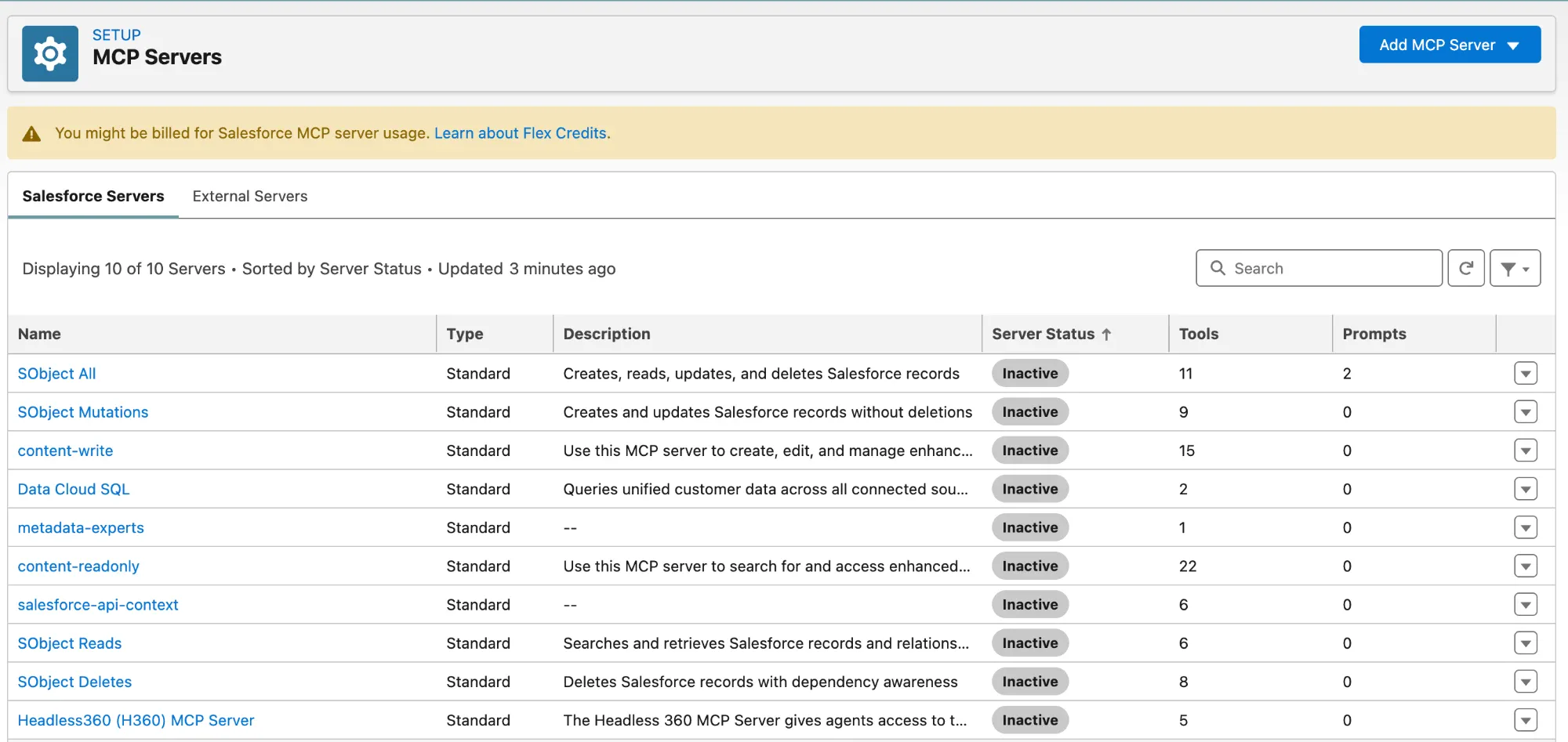
Setup → MCP Servers. Every server starts out Inactive. -
Create a permission set (recommended)
In Setup → Permission Sets, create one for the people who should use Salesforce in Claude. It's optional, but without it every user in the org is authorized.
-
Create the External Client App
In Setup → External Client App Manager, click New External Client App and name it
Salesforce - Beta. Then:- Enable OAuth and set the callback URL to
https://claude.ai/api/mcp/auth_callback. - Add two OAuth scopes: Access Salesforce hosted MCP servers (
mcp_api) and Perform requests at any time (refresh_token, offline_access). - On the app's Policies tab, set Permitted Users to Admin approved users are pre-authorized, add your permission set, and assign that permission set to the right users.
- Under OAuth Settings → Security, turn on Issue JSON Web Token (JWT)-based access tokens for named users.
- Copy the app's Consumer Key and Consumer Secret for the Claude admin.
- If your team also uses another AI tool, create a separate External Client App for each one. Salesforce recommends one app per client, so access can be granted or withdrawn per tool.
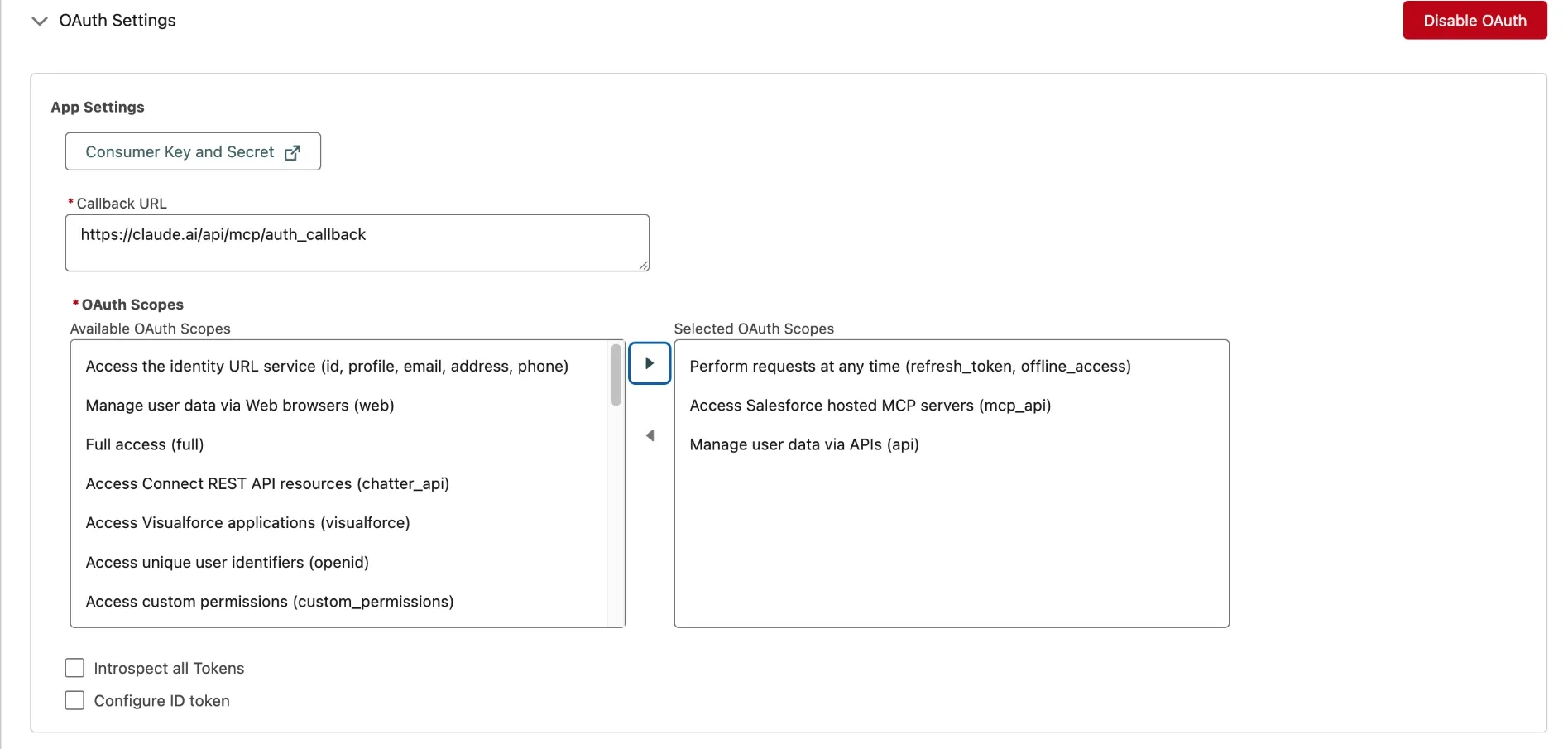
The OAuth settings from our tested setup. We also added the apiscope.Watch out: don't pick a self-authorization option. It lets users connect without being authorized by your permission set.
- Enable OAuth and set the callback URL to
In Claude
-
Connect Claude to your org
In Claude, go to Organization Settings → Connectors, find Salesforce - Beta, and enter the Consumer Key and Secret.
-
Install the plugin
In Organization Settings → Plugins, install Sales Cloud in Claude. This installs it for you only; rolling it out to others is a separate step.
-
Set tool restrictions to keep the beta read-only
In Organization Settings → Connectors → Salesforce - Beta, open the … menu and choose Tool Restrictions:
Tool Setting Dispatch API Deny (blocks creating, updating and deleting records) Dispatch read-only API Always Allowed Discover Always Allowed Describe Always Allowed Display Widget (if listed) Always Allowed Everything else No Restriction -
Roll out the plugin
Back in Organization Settings → Plugins, choose how users get it: Installed by Default for everyone in the beta, Available to Install so people add it themselves, or User groups, for example on by default for the sales team only.
-
Each user signs in
Users go to Customize → Connectors, find Salesforce - Beta, click Connect and sign in with their Salesforce credentials. To confirm it works, ask Claude something tied to your own access, such as "What accounts do I own?"
Can you connect Salesforce's MCP servers to Claude as a custom connector?
Tested by 21 Knots in our own Salesforce org on September 21, 2026.
Yes. Instead of the Salesforce - Beta connector, you can add Salesforce's hosted MCP servers to Claude yourself. Claude gets direct tools to search, query and update records, but not the Sales Cloud in Claude plugin or its prebuilt skills. Here is exactly what worked for us.
-
Activate only the servers you need
In Setup → MCP Servers, open each server and click Activate. We turned on two:
Server What it does Our choice SObject Reads Searches and retrieves records and relationships (6 tools) On. Read-only, the safe place to start. SObject Mutations Creates and updates records, no deletions (9 tools) On, only if Claude should change records. SObject All, SObject Deletes Include deleting records Off Data Cloud SQL, content-readonly, content-write and the rest For specific products and developer work Off, unless you use them -
Copy each server's URL
Each active server shows its Server URL under Authentication Details. Ours were
https://api.salesforce.com/platform/mcp/v1/platform/sobject-readsandhttps://api.salesforce.com/platform/mcp/v1/platform/sobject-mutations. They don't include your org's domain: Salesforce works out your org when you sign in.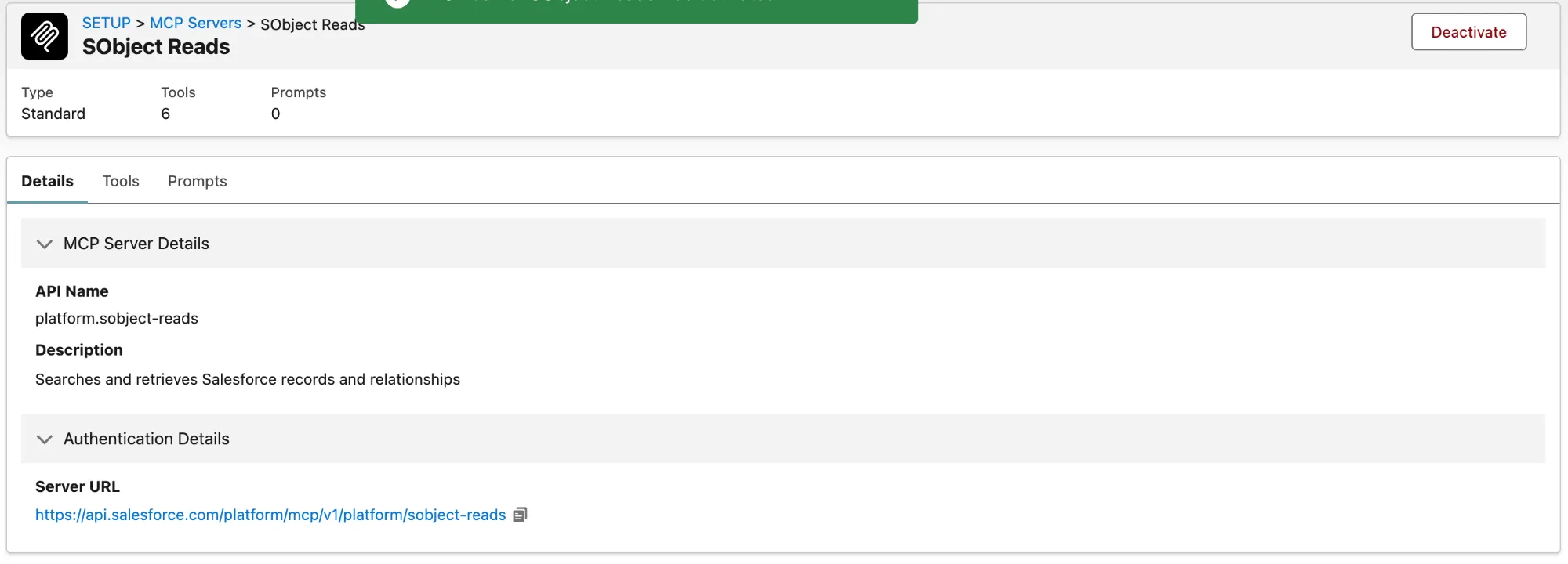
An active server, with the Server URL you paste into Claude. -
Set up the External Client App
Use the same External Client App settings as step 3 above: the callback URL
https://claude.ai/api/mcp/auth_callbackand themcp_apiandrefresh_token, offline_accessscopes. We also addedapi. One app, with one Consumer Key and Secret, works for every server. -
Add one custom connector per server in Claude
In Claude's connector settings, choose Add custom connector, give it a name such as
Salesforce Readsand paste the server URL. Then:- Authentication: Sign in now (Claude detects it).
- OAuth client: Use your own OAuth client. Paste the Consumer Key as the client ID and the Consumer Secret as the secret. Salesforce requires the secret.
- Transport: leave it on Streamable HTTP.
Click Add, then Connect, and sign in to Salesforce. Repeat for SObject Mutations with its own URL and the same key and secret.
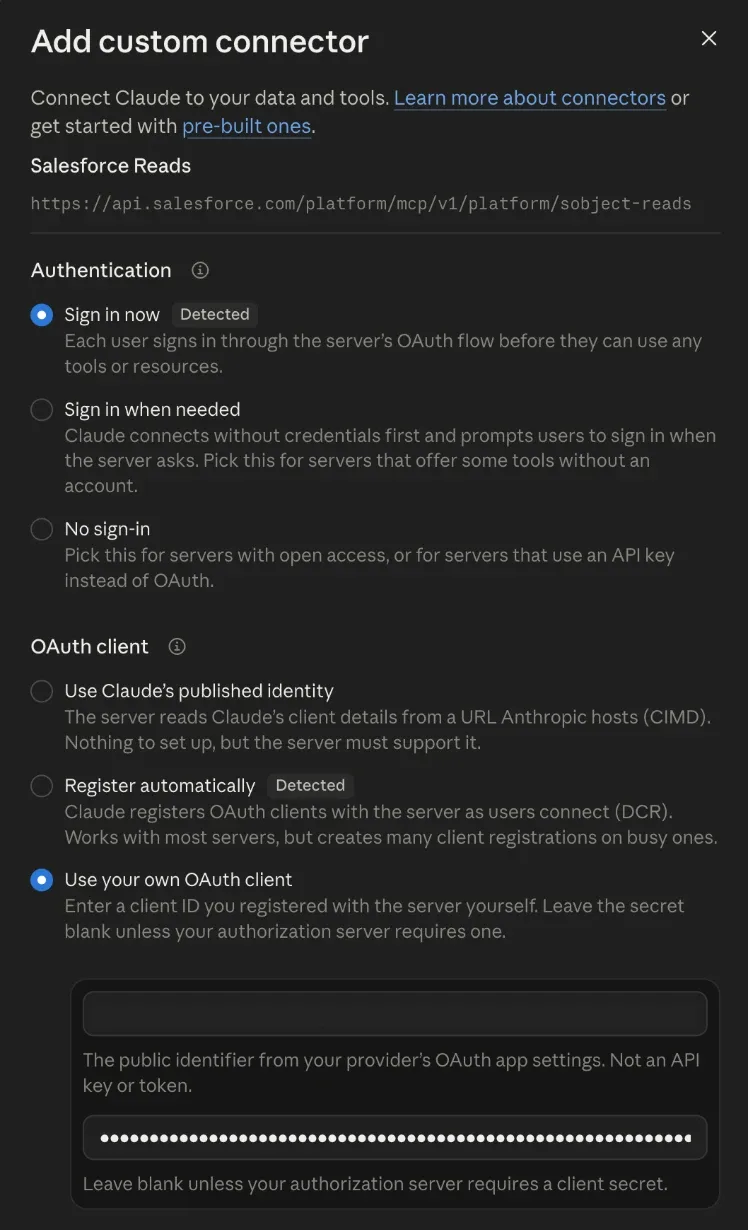
Claude's custom connector settings for SObject Reads. -
Test it
Start a new chat and ask something only your own access can answer, such as "List my 5 most recently modified accounts." With the Reads server, Claude can find records, run SOQL queries, list recent records, read an object's fields and follow related records. Mutations adds creating and updating records.
Before you roll this out: the same rules apply as for the beta. Set the External Client App to Admin approved users are pre-authorized with a permission set, not self-authorization, and give the Mutations connector only to people who should be able to change records from Claude.
Want it set up right the first time?
Salesforce in Claude answers from your org exactly as it is. If ownership is out of date, stages don't mean the same thing to every rep, or permissions are looser than you think, Claude's answers will reflect it. Our Claudeforce Readiness Check, from $2,500, finds those problems before your team starts relying on Claude, and we can handle the setup and rollout with you.
What can Salesforce in Claude do?
The beta includes 37 prebuilt skills. You don't need to know their names: Claude picks the right skill from a plain request like "prep me for my Acme call tomorrow," or you can call one directly by typing / and the skill's ID.
Account intelligence and research
- See account context
- Research new prospects
- Build account plans
- Prioritize your accounts
- Map deal stakeholders
- Find expansion opportunities
Deals and opportunities
- Review deal health
- See what’s blocking a deal
- Track deal signals
- See what happens if a deal slips
- Build close plans
- Update opportunities
- Handle objections
Pipeline and forecasting
- Review my pipeline
- Review team pipeline
- Write my forecast story
- Audit CRM hygiene
- Wrap up the week
- Analyze win/loss patterns
Customer success and renewals
- Check customer health
- Track renewals
- Surface customer feedback
Leads and prospecting
- Triage inbound leads
- Assign contacts and leads to an agent
- Draft prospect outreach
Meetings and calls
- Prep for customer calls
- Follow up after calls
- Summarize call transcripts
- Schedule meetings
- View my calendar
Daily workflow
- Start my day
- Sweep my inbox
- Log customer activity
- See activity history
- Prep for rep one-on-ones
- Find internal answers
Personalization
- Set up my voice profile
Where can you learn more on Trailhead?
Salesforce's Trailhead modules are a good way to understand Salesforce in Claude and AIforce. They explain the concepts and how the pieces connect, but none of them walk through setting it up in your own org. For that, use the steps above.
- Sales Cloud in Claude: Quick Look
What Salesforce in Claude is and how the plugin connects Claude to Salesforce and your other tools. Concepts and a quiz; no setup steps.
- Introduction to AIforce
What “headless” Salesforce means and the vocabulary behind AIforce.
- Get Started with AIforce
The bigger picture of running Salesforce from AI tools: MCP, APIs, data foundation, security and use cases.
Frequently asked questions
What is the difference between Claudeforce, Salesforce in Claude and Sales Cloud in Claude?
Claudeforce is the name of the Salesforce and Anthropic partnership. Salesforce in Claude is its first product line, for sellers and revenue teams. Sales Cloud in Claude is the Claude plugin that delivers it. Salesforce also groups this under AIforce, its umbrella for bringing Salesforce into AI interfaces like Claude and Slack.
Is Salesforce in Claude the same as Agentforce Coworker?
No. They are two different ways to use AI with Salesforce. Salesforce in Claude is a Claude plugin: it connects Claude Enterprise to your org, and during the beta it only reads data and drafts. Agentforce Coworker is Salesforce’s own AI assistant, turned on inside Salesforce. At Dreamforce 2026, Salesforce said Coworker can draw on data sources beyond Salesforce, take actions like updating records, and appear in tools including Claude, ChatGPT, Microsoft Teams, desktop and mobile. Coworker runs on Claude behind the scenes, so both share the same underlying models. Turning it on is quick: in Setup, search for Coworker, use the toggle, choose whether it may take actions or stay read-only, connect Slack or Data 360 if you use them, then assign a permission set to the people who should have it. On licensing, a Salesforce customer walked through the options at Dreamforce 2026: Starter and Pro Suite were said to include some usage from around October 2026; any org with Salesforce Foundations gets flex credits and can pay per use; the Agentforce add-ons for Sales, Service or Platform include unmetered use; there is a per-user Coworker subscription; and Agentforce Max Edition includes unlimited use. Salesforce hasn’t published those details, so confirm them with your account executive before planning around them.
How is Claudeforce different from Agentforce, Agentforce Coworker and Slackforce?
They are parts of one strategy that Salesforce calls AIforce: bringing Salesforce data, workflows and permissions into the tools people already work in. Claudeforce brings Salesforce into Claude, starting with Salesforce in Claude for sales teams. Slackforce does the same in Slack, where Slackbot can answer questions and update Salesforce records. Agentforce Coworker is Salesforce’s own AI assistant, turned on inside Salesforce. Agentforce is the platform for AI agents that do work on your behalf, including prebuilt agents such as Hunter for outbound prospecting, Piper for website leads and Casey for customer help. They can work together: at Dreamforce 2026, Salesforce showed a seller planning accounts in Claude and handing outreach to Hunter.
Does Salesforce in Claude require Claude Enterprise?
Yes. Salesforce’s help documentation lists Claude Enterprise as a requirement. The connector and plugin are installed from Claude’s Organization Settings, which an Enterprise admin manages.
Which Salesforce editions support Salesforce in Claude?
Group, Essentials, Starter Suite, Pro Suite, Professional, Enterprise, Performance, Unlimited and Developer editions, according to Salesforce’s help documentation.
Do I need Data 360 or Agentforce licenses?
Salesforce’s requirements for Salesforce in Claude don’t list Data 360 or Agentforce. One skill hands leads to an Agentforce agent, which only applies if you use that agent.
How do I join the Salesforce in Claude beta?
Use the Join the beta link on Salesforce’s Claudeforce page. At Dreamforce 2026, Salesforce announced the beta is open to all customers. The request form asks for a primary admin contact, your Salesforce production org ID, your Anthropic organization ID and acceptance of Salesforce’s program agreement. Submitting is a request for access, not a confirmation.
What happens when the Salesforce MCP server leaves beta?
At Dreamforce 2026, Salesforce said the Salesforce MCP server is planned to become generally available in November 2026. It will move to a new generally available version with a new server URL, so existing connections will need a short migration. Salesforce said the functionality stays the same. Salesforce’s MCP roadmap session repeated the November date and said the generally available server adds a Display tool that renders Salesforce widgets inside the chat. Roadmap dates can change, so plan for a reconnect step rather than counting on a specific date.
Which Salesforce MCP servers should I activate?
Only the ones you need, because each active server can use Flex Credits. In our own org, the MCP Servers page in Setup listed ten standard servers, all inactive at first. SObject Reads searches and reads records and is the safe place to start. SObject Mutations adds creating and updating records, with no deletions. SObject All and SObject Deletes can delete records, so leave them off unless you have a clear reason. The others, such as Data Cloud SQL, content-readonly and content-write, only matter if you use those products. There is also a Salesforce API Context server, which returns metadata rather than records: it describes objects, fields and relationships, which is more useful to an admin or a developer than to a salesperson. In a Dreamforce 2026 hands-on training, Salesforce’s instructors connected an outside agent to an org with exactly two servers activated, Salesforce API Context and SObject All.
Can I connect Salesforce to Claude without joining the beta?
In our testing, yes. We activated SObject Reads and SObject Mutations in our own org and added each one to Claude as a custom connector, using the server URL from Setup and the Consumer Key and Secret from an External Client App. That gives Claude direct tools to search, query and update records, but not the Sales Cloud in Claude plugin or its 37 skills. The steps are in the custom connector section of this guide.
Can Claude change records in Salesforce during the beta?
Not with the setup Salesforce documents. During the beta, skills only read data or prepare drafts for review, and admins keep it that way by setting the connector’s Dispatch API tool to Deny. Salesforce’s Dreamforce 2026 demos did show Claude updating records, which the connection is capable of, so treat write access as a deliberate decision for later rather than something to switch on during the beta.
Can we expose only part of the org instead of everything?
Yes, and there are three levels to it. You choose which MCP servers are active, so you can keep the connection read-only by activating only the read servers. You can restrict individual tools on the connector, which is how admins keep the beta read-only. And if the standard tools are still broader than you want, Salesforce said at Dreamforce 2026 that you can build your own MCP server from things your org already has: named SOQL queries, Apex invocable actions, Apex REST and @AuraEnabled methods, auto-launched flows, Connect APIs, agents and prompt templates. In a Dreamforce 2026 hands-on training, Salesforce’s instructors described the same idea in plainer terms: write the query, Apex class or flow yourself, expose that as the tool, and the agent can only do the specific thing you defined. There is a practical reason to narrow it too, not just a security one: every available tool is described to the model on each request, so a connection carrying hundreds of tools gets slower and less accurate at picking the right one. A certified technical architect speaking at Dreamforce 2026 said he hit that wall at about 200 tools on an agent he built.
Will Claude see data a user isn’t allowed to see?
No. Salesforce in Claude uses the same permission model Salesforce already uses, so Claude only sees what the signed-in user can see. That also means gaps or errors in your permissions show up in Claude’s answers. Salesforce also said at Dreamforce 2026 that agentic identity started a pilot during Dreamforce week, with general availability planned for November 2026: an agent gets its own registered identity and can be given less access than the person it works for, starting with which objects it may touch. Salesforce compared it to a valet key. Controlling which MCP servers and tools a user’s agent can see, through profiles and permission sets, was also described as coming.
What is Zero Data Retention (ZDR), and does it apply to Salesforce in Claude?
Traditionally, Zero Data Retention (ZDR) means the AI provider deletes your prompts as soon as it answers and never trains on them. For Claudeforce, Salesforce and Anthropic describe an evolution of ZDR called Enterprise Frontier Safeguards. At Dreamforce 2026, Anthropic explained that a history of activity against the model is kept so that attacks like stolen credentials can be spotted over time, but that history is stored in the customer’s own cloud account, encrypted with the customer’s own keys. Anthropic runs automated checks for serious misuse, and any flag goes to the customer. Anthropic also said it has never trained on enterprise customers’ data unless they explicitly ask, and that this isn’t changing. Salesforce’s Claudeforce page lists ZDR on Claude’s Sonnet, Opus and Haiku models, with Enterprise Frontier Safeguards rolling out in fall 2026, and its help documentation says data that reaches Anthropic is governed by your organization’s own contract with Anthropic. If strict ZDR is a requirement for your business, ask Anthropic how Enterprise Frontier Safeguards applies to your Claude Enterprise agreement before connecting production data.
What should we check before connecting sensitive Salesforce data to Claude?
Confirm your data handling terms with Anthropic, including ZDR and Enterprise Frontier Safeguards. Create a permission set so only approved users can connect, and never allow self-authorization on the External Client App. Keep the Dispatch API tool set to Deny so Claude can’t change records during the beta. Review field-level security and sharing on sensitive fields, because Claude can see whatever each signed-in user can see. If you use Data 360, Salesforce showed at Dreamforce 2026 how to tag sensitive fields like tax IDs as confidential and apply a masking policy, so agents working in Claude see only the last four characters. Security Center Essentials, which Salesforce now includes for every customer at no additional cost, is a good starting view of your org’s security settings and connected apps. Two more things shown at Dreamforce 2026 are worth a look: Privacy Center’s compliance agent, which finds unclassified personal data and proposes fixes, and the Transaction Security Policy Accelerators, a free Salesforce Labs app on AgentExchange with ready-made policies, including one that blocks report exports containing high-risk fields. The accelerators need Salesforce Shield or Event Monitoring. Salesforce also said at Dreamforce 2026 that Event Monitoring logs, including the free tier, record the connected app behind each API call, so you can tell work done through Claude apart from work done by people. Watch the retention: the free tier keeps those logs for a day and the paid tier for 30 days, so on the free tier export them if you want a history to investigate with later. Two more things from Salesforce’s Dreamforce 2026 security roadmap: Event Monitoring customers now get a policy switched on by default that requires step-up authentication before anyone exports a report of more than 10,000 records from the user interface, and Observability Center, planned for general availability in January 2027, is meant to trace each piece of an agent’s work back to the agent’s own identity, including the MCP calls, Apex and flows behind it.
Can we stop Claude from reading one specific sensitive field?
Yes, and permissions are not the only way. Salesforce showed the mechanism at Dreamforce 2026. First you classify the field, which Security Center now lets you do for your whole data model from one screen instead of field by field in Setup: a compliance category and a sensitivity level such as confidential. Then you write a transaction security policy, a feature of Event Monitoring, that triggers on a classified field and either notifies someone, requires step-up authentication or blocks the action outright with a message you write. Think of it as a validation rule for user activity rather than for data. The part that matters here is where it runs: the policy sits at the platform layer, so it applies to every surface. In the demo, a user was blocked from exporting a report containing a social security number, then tried to get the same data by asking an AI agent instead, and hit the identical block because the policy also catches the API call. You build these with a point-and-click condition builder or, for harder cases, an Apex class. A good habit from the same session: set the action to notify only at first, watch what trips, then switch it to block.
Should we create a permission set?
Salesforce marks it optional but recommended. Without one, every user in the org is authorized to use the connection. With one, only users you assign get access. The permission set is what the External Client App points at when you set Permitted Users to “Admin approved users are pre-authorized”. Salesforce’s instructors made a useful point about this at Dreamforce 2026: adding or removing people from that permission set doesn’t touch the integration itself, so you can change who has access without reconnecting anything.
How much does Salesforce in Claude cost?
Salesforce hasn’t announced pricing. Its announcements say pricing and packaging are subject to change. You do need Claude Enterprise, which is priced separately by Anthropic. Use of the Salesforce MCP servers can also draw on Flex Credits, and how much depends on what people ask for, so ask your Salesforce account team what your consumption looks like before you open it to a large group.
What about the other direction, Salesforce calling out to other tools?
It runs on the same protocol but the safety model is reversed, and this is where people get hurt. Connecting Claude to Salesforce is inbound: Claude signs in as a person, so your sharing rules, field-level security and profiles all still apply. An Agentforce agent calling out to an outside system is outbound, and it inherits that system’s security model, not yours. A certified technical architect speaking at Dreamforce 2026 walked through the failure: a customer-facing agent that looked up a claim by number happily returned the next customer’s claim when someone typed the next number, because the system on the other end had no sharing rules and the agent had no reason to doubt it. Outbound connections usually authenticate as one shared integration identity, so your logs show that integration rather than the person who asked, and anything destructive or sensitive is worth putting behind a step-up authentication at the moment the tool runs. If you are doing both directions, govern them separately. Salesforce is building tooling for this: it now keeps a registry of the third-party MCP servers registered in your org and automatically risk scores each server and each tool, including looking for tool poisoning in tool descriptions, with the scores and drift alerts surfacing in Security Center.
Does it work with Slack?
Yes. Slack is the one extra connector built into the plugin, used for internal context and drafted Slack summaries. Email, calendar and file connectors can be added separately in Claude.
Does our data need to be clean before we connect Claude?
Cleaner than you think, and for a reason that is easy to miss. Your team already works around bad data: they know the field nobody fills in, they know which close dates are wishful, and they ask a question when a number looks wrong. Claude does not know to doubt what it reads, so it answers confidently from whatever is there. Stale records, two fields that mean almost the same thing, and duplicate accounts are the usual culprits. The other half is metadata: object, field and flow descriptions are what tell Claude what a field means, and a blank description on a field called Date 2 leaves it guessing. A solution architect speaking at Dreamforce 2026 put it as “humans ask, agents assume”, and Salesforce’s own SVP of solution engineering named the data foundation as the first prerequisite for Claudeforce, ahead of executive sponsorship and change management. You do not need a perfect org, but you should know which parts of it Claude will be reading and whether those parts are true.
Can we customize the skills?
Yes. Salesforce publishes the plugin on GitHub as open source. Teams can add their own context, such as ideal customer profile, qualification framework, competitors and writing style, and adapt skills to their sales process. Salesforce also said at Dreamforce 2026 that custom skills can be written in Agentforce Studio, which is in pilot and aimed first at Agentforce Coworker, with work under way to make those skills available to any agent through the Salesforce MCP server. Skills built that way are stored in Salesforce rather than on each person’s computer, follow your sharing rules, are private by default until shared, and are expected to be packageable. Salesforce hasn’t said which licenses custom skills require.
What if we want Claude to build in Salesforce, not just read from it?
That is a different tool. Salesforce in Claude is for people who work in the CRM. For admins and developers, Salesforce publishes a separate Salesforce development plugin for Claude Code, available in Claude’s plugin marketplace. Salesforce described it at Dreamforce 2026 as about 40 core platform development skills plus more than 100 specialised ones that load only when they are needed, along with development agents, hooks and command line tools, updated weekly. Anthropic’s own Salesforce team showed what they built with it: an automatically maintained data dictionary, plain-English documentation of every flow, a flow review that ranks what to fix, and their coding standards written down as skills the whole team can run. Salesforce also said every Developer Edition org now ships with Claude enabled and a monthly allowance of free usage, which makes a Developer org the cheapest place to try any of this.
How should we introduce this to the team?
Not with an all-company email about how excited you are. Two Salesforce strategists made the case at Dreamforce 2026 that rolling out an agent is not like rolling out a new screen: the question stops being “how do I use this” and becomes “am I being replaced, and who is accountable when it gets something wrong”. Three things they recommend, all of which are cheap. Name the human who is accountable for the agent’s output, by name, before you turn it on. Demonstrate it live and make sure people see a person overriding it, because that is the moment they decide whether to trust it. And measure the right thing: logins tell you nothing, so at about 60 days ask whether people would keep using it if they did not have to. They cite Gartner’s finding that more than 40% of agentic AI projects will be cancelled by the end of 2027, with most of the causes being human rather than technical.
Is it only for Sales Cloud?
For now. The beta covers sales and revenue teams. Salesforce lists other areas, including Service, Marketing, Commerce and Data 360, as coming soon. Separately from the sales plugin, more of Salesforce is becoming readable from Claude through the MCP servers: at Dreamforce 2026 the security team showed Security Center answering questions in Claude and in Slack, with the ability to change settings that way still to come.
Sources
Compiled by 21 Knots, a Salesforce partner, from Salesforce's documentation and Dreamforce 2026 announcements. We'll keep it current as the beta changes.
- Salesforce: Claudeforce (Join the beta)
- Salesforce Help: What Is Salesforce in Claude (Beta)
- Salesforce Help: Activate the MCP Server
- Salesforce Help: Create and Configure the External Client App
- Salesforce Help: Set Tool Restrictions
- Salesforce: AIforce announcement
- Salesforce Help: Security, Permissions, and Data Handling
- Salesforce Help: Skills Reference (Beta)
- Salesforce+: Security Keynote, Dreamforce 2026
- Salesforce+: Intro to AIforce for Admins, Dreamforce 2026
- Salesforce+: Personalize Agentforce Coworker with Reusable AI Skills, Dreamforce 2026
- GitHub: salesforce/salesforce-skills